
OpenXcom runs natively on Linux and plays the original X-COM with its old bugs and limits fixed. It’s free and open source, but it’s an engine, not the game: you need the files from a copy of X-COM: UFO Defense, which Steam and GOG still sell. Since January 2026 the project recommends its Extended version, OXCE.
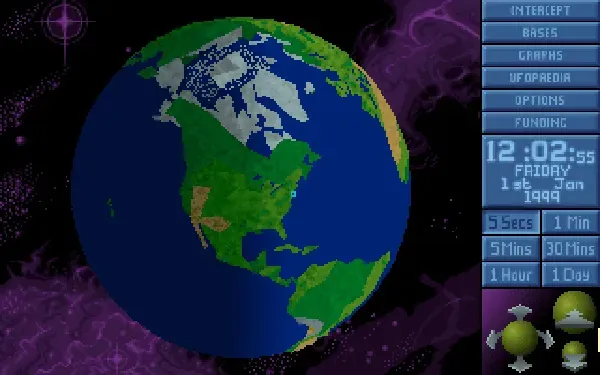 X-COM: UFO Defense, the game OpenXcom runs. Screenshot: the game’s Steam store page.
About the game
Aliens are abducting cattle, and it’s your job to fund, staff and equip the organisation that stops them. UFO: Enemy Unknown (X-COM: UFO Defense in the US) is MicroProse’s 1994 classic: a strategy layer on a spinning globe, where you build bases and research alien tech, and a turn-based tactical layer, where rookies die horribly in cornfields. It’s tense, unfair and endlessly replayable. OpenXcom is a complete rewrite of its engine, in C++ with SDL, that keeps the game exactly as it was while fixing the bugs and limits of the DOS original, and adding modern resolutions, quality-of-life options and a huge mod scene. It plays the sequel, Terror from the Deep, too.
How it runs
Natively. OpenXcom runs as a Linux program and reads the original game’s graphics, maps and sounds from your copy. No DOSBox or Wine.
- Which version: since January 2026 the project recommends OpenXcom Extended (OXCE). Plain OpenXcom is now a legacy version that only gets bug fixes (openxcom.org). OXCE plays the same original game with more options for modders.
- Linux builds: the project’s nightly builds are made for Linux as well as Windows by GitHub Actions. Several distributions package it, OXCE as
openxcom-extendedin the AUR (Repology: OpenXcom, Repology: OXCE). It is not on Flathub.
Install and setup
- Get the original game. Any of these work: the DOS version 1.4, the Windows / Collector’s Edition, or the Steam or GOG releases (installation guide on UFOpaedia). Don’t use a copy modded with XcomUtil; it can cause crashes. Terror from the Deep is optional.
- Copy only these folders from the game’s directory:
GEODATA,GEOGRAPH,MAPS,ROUTES,SOUND,TERRAIN,UFOGRAPH,UFOINTRO,UNITS. Copying the whole game folder does not work. - Put them in a
UFOfolder in OpenXcom’s data folder (see the next section); Terror from the Deep goes in aTFTDfolder beside it.
The Steam release on Linux. Steam sells X-COM: UFO Defense as a Windows game only, so the Linux client won’t install it until Steam Play is on. Either turn on Enable Steam Play for all other titles under Steam → Settings → Compatibility, or tick Force the use of a specific Steam Play compatibility tool in the game’s Properties → Compatibility (how the two settings interact, from Valve’s issue tracker). Steam only has to download the files: you never start the game itself.
Steam installs it in a folder called XCom UFO Defense, with the game files in an XCOM folder inside (the game’s Steam config on SteamDB). With Steam’s default library:
mkdir -p ~/.local/share/openxcom/UFO
cd ~/.local/share/Steam/steamapps/common/"XCom UFO Defense"/XCOM
cp -r GEODATA GEOGRAPH MAPS ROUTES SOUND TERRAIN UFOGRAPH UFOINTRO UNITS ~/.local/share/openxcom/UFO/
If cd can’t find the folder, your library is somewhere else. The Flatpak version of Steam keeps it under ~/.var/app/com.valvesoftware.Steam/.local/share/Steam/steamapps/common/, and a second drive or SD card has its own steamapps/common/. The quickest way to find it: right-click the game in Steam → Manage → Browse local files.
Letter case matters only for the folder you copy into: name it exactly UFO (or TFTD), because OpenXcom looks for that name as written (Options.cpp). The case of everything inside doesn’t matter, because OpenXcom lowercases every file path before it looks a file up (FileMap.cpp).
Saves and settings
On Linux, OpenXcom follows the XDG folders (README, directory locations):
~/.local/share/openxcom/   # UFO/ and TFTD/ game files, saves, mods
~/.config/openxcom/        # settings
$XDG_DATA_HOME and $XDG_CONFIG_HOME move them if you’ve set those. OpenXcom isn’t on Steam, so there’s no Steam Cloud; back up your saves yourself.
Known issues and fixes
-
No music. The original soundtrack is MIDI, which OpenXcom plays through SDL_mixer 1.2. Its built-in TiMidity can’t read the
soundfontlines many distributions now put intimidity.cfg, so the game starts without music (issue #1414). Two fixes from that thread:-
Set Options → Audio → Music Format to Adlib. That plays the DOS version’s Adlib music instead of MIDI. The Steam release is the DOS version (Steam runs it in DOSBox), so this works with it.
-
Or tell SDL_mixer which soundfont to use when you start the game. This worked for the reporter on Arch; the soundfont path differs between distributions:
SDL_SOUNDFONTS=/usr/share/soundfonts/FluidR3_GM.sf2 openxcom
-
-
Mouse trouble with sdl12-compat. Some distributions, Arch among them, ship SDL 1.2 as
sdl12-compat, a compatibility layer on top of SDL2. In 2022 that froze the Geoscape while scrolling with the mouse button held (#1382; installing the original SDL 1.2 fixed it for the reporter) and made the Battlescape cursor jump when changing levels with the mouse wheel (#1386, fixed in sdl12-compat). If scrolling misbehaves, update sdl12-compat first.
Steam Deck
OpenXcom is not on Steam, so Valve has not rated it. Valve rates the Steam release of X-COM: UFO Defense Unsupported, but that rating is for the original game, which you only need for its files. OpenXcom itself is a mouse-driven game; on a Deck, add it as a non-Steam game and use the trackpad.
Mods
Mods go in the mods folder in the data folder above. There are hundreds on the mod portal, from small balance tweaks to total conversions that are practically new games; enable them under Options → Mods. Many of the big ones need OXCE.
Similar games
- Hard West: XCOM-style tactics in a supernatural Wild West.
- OpenRA: another open-source engine for 1990s classics.
- Open-source games on Linux: more engine remakes.
Where to get it
OpenXcom and OXCE are free from openxcom.org or your distribution. The original game is sold on Steam as X-COM: UFO Defense and X-COM: Terror from the Deep. UFOpaedia also lists the GOG release as working.